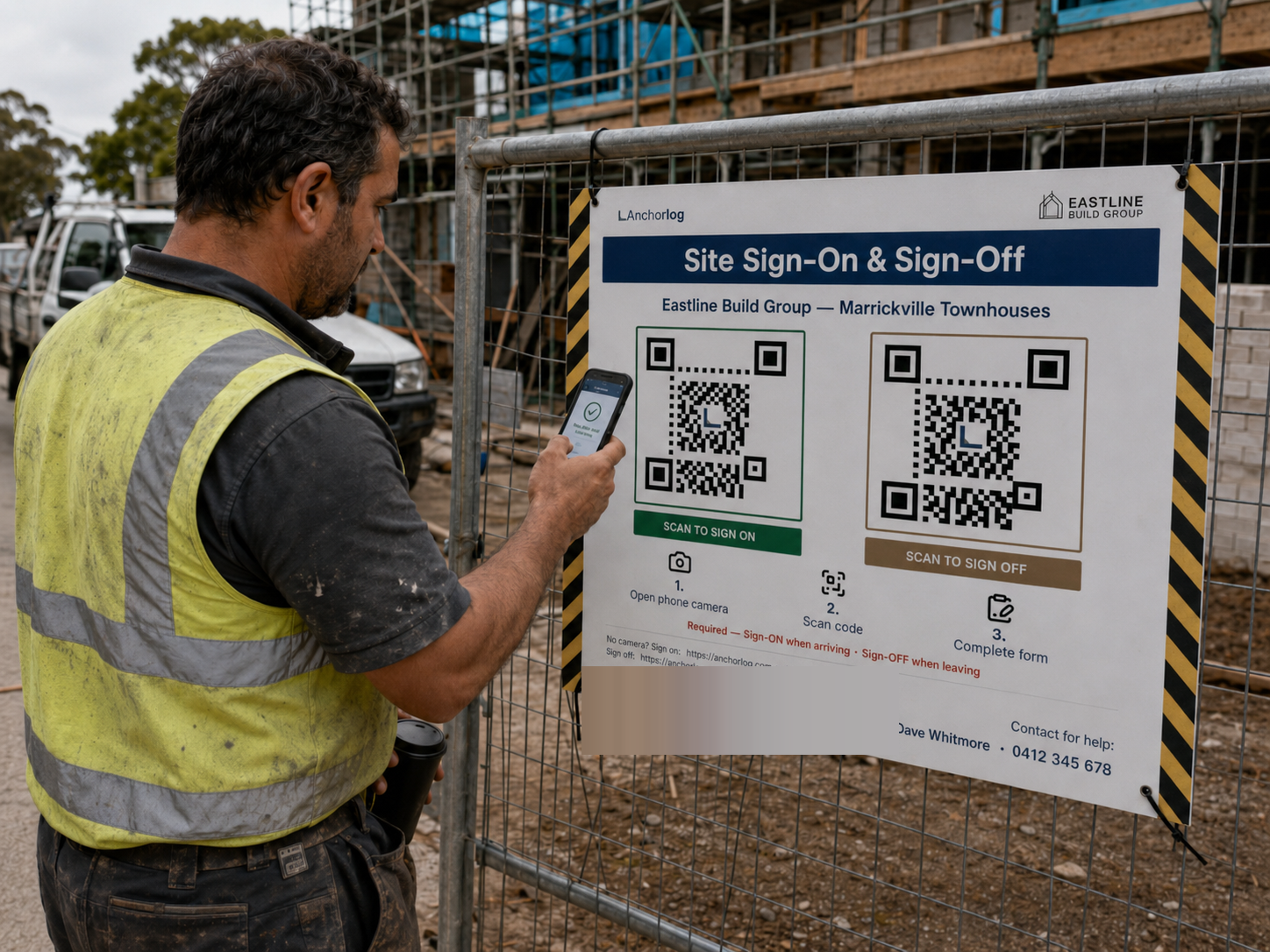
Sub-3-second sign-on. Workers scan a Coreflute QR board at site entry. No app install for subbies.
Audit pack assembles itself. Every record retention-tagged from day one, the full pack exported in one action.
No per-worker fees. Subbie volume doesn't punish the contract. Unlimited workers on every plan.
The day SafeWork knocks
After a notifiable incident, the records you have are the records that survive.
There is no opportunity to retrofit. The day SafeWork knocks (or the moment a DPP investigator arrives) is the wrong day to discover paper sign-on doesn't survive an audit.
Anchorlog is built to produce the evidence at the moment SafeWork or a DPP investigator arrives: every sign-on, every induction, every SWMS acknowledgement time-stamped, retention-tagged and exportable on demand.
Every sign-on is recorded to the second: 06:42:19. One action pulls the pack together.
What Anchorlog does
Audit pack: 30 seconds. Not 3 days.
Three things, narrowly. The rest of your safety-management system stays where it is.
Plan ahead: of everything that has to be in place when the gate opens, the workplace-surveillance notice is the one that has to happen a fortnight early. Your workers need it about two weeks before the site starts. Do it from the dashboard: Anchorlog records how and when you gave it, emails it to the workers with an email on file, and exports the attestation when someone asks.
01
Sign-on your subbies actually do.
They scan the QR board at the gate and put in a mobile number. No app to install, no account to create, no password. Under three seconds to sign on and under three to sign off, so nobody walks around it.
02
The audit pack assembles itself.
Every sign-on, induction and SWMS acknowledgement is retention-tagged the moment it's captured, and the record is kept seven years. When the question finally comes, it's one export, not days of chasing paper.
03
You never write an induction from scratch.
Create a site and its induction is already there: the trade questions branching on their own, the right tickets asked for, yours to change if you want. And when a worker's ticket is coming up for expiry, Anchorlog texts or emails him directly as the deadline gets close.
Why we built this
We've sat in the carpark with builders the night before.
Empathy
“We've watched builders reconstruct an audit pack at 23:47, in the carpark. That's the wrong time to discover paper sign-on doesn't survive an audit.”
No founder photo at v1 (direction brief §5.1.1 LOCKED). Future trigger fills this slot.
Competency
Anchorlog doesn't replace your full safety-management system. We replace paper sign-on, the contractor paperwork that comes with it, and the audit-pack reconstruction that follows.
This is what we do. It's all we do. Not a scheduling tool. Not timesheets. Not project management. Not a training-course platform. Not a generic compliance suite.
How Anchorlog works
Three steps. We help you bring your worker list across.
No installer required. No subbie training.
1
Set up your first site.
No installer required. You put in the site's address and what kind of job it is. The induction is already written: the trade questions branching on their own, the right tickets asked for, yours to adjust. Anchorlog hands back the site's own QR code.
2
Order your Coreflute QR board.
It's posted to you. You hang it at site sign-in. The board itself is a one-off materials cost, not part of your subscription. We do the artwork and the ordering. Workers scan in under 3 seconds. No app install for subbies, no accounts to manage. After they induct, a worker can add their pass to Apple Wallet or Google Wallet. If the pass is ever re-issued, they add it again. It doesn't refresh by itself.
3An illustration, not a screenshot. The product's own screens are further down this page.
The audit pack assembles itself.
Exportable on demand. Every record retention-tagged from the day it's captured.
Every picture below is the product, running on a sample site built to show it. No real worker, site or company appears anywhere on this page.
What the worker sees
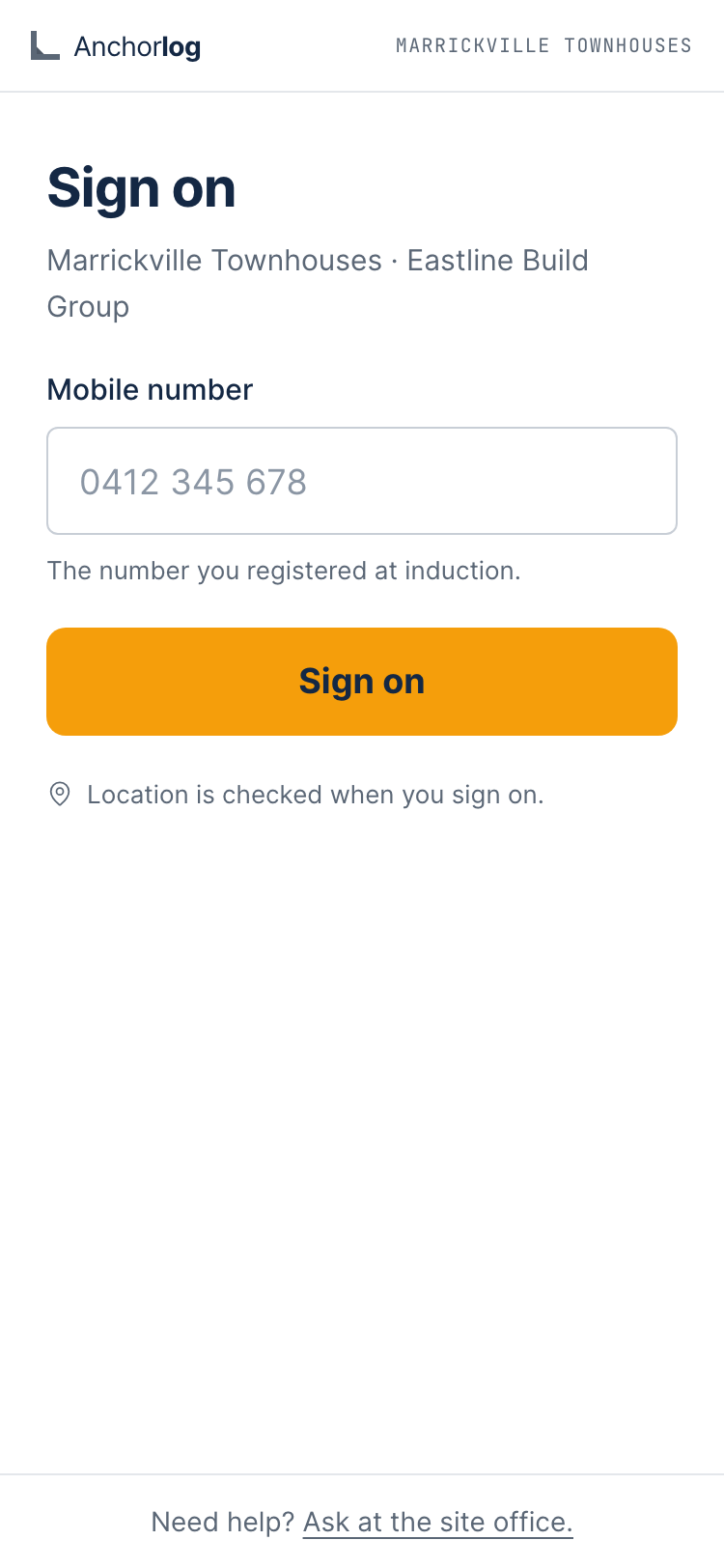
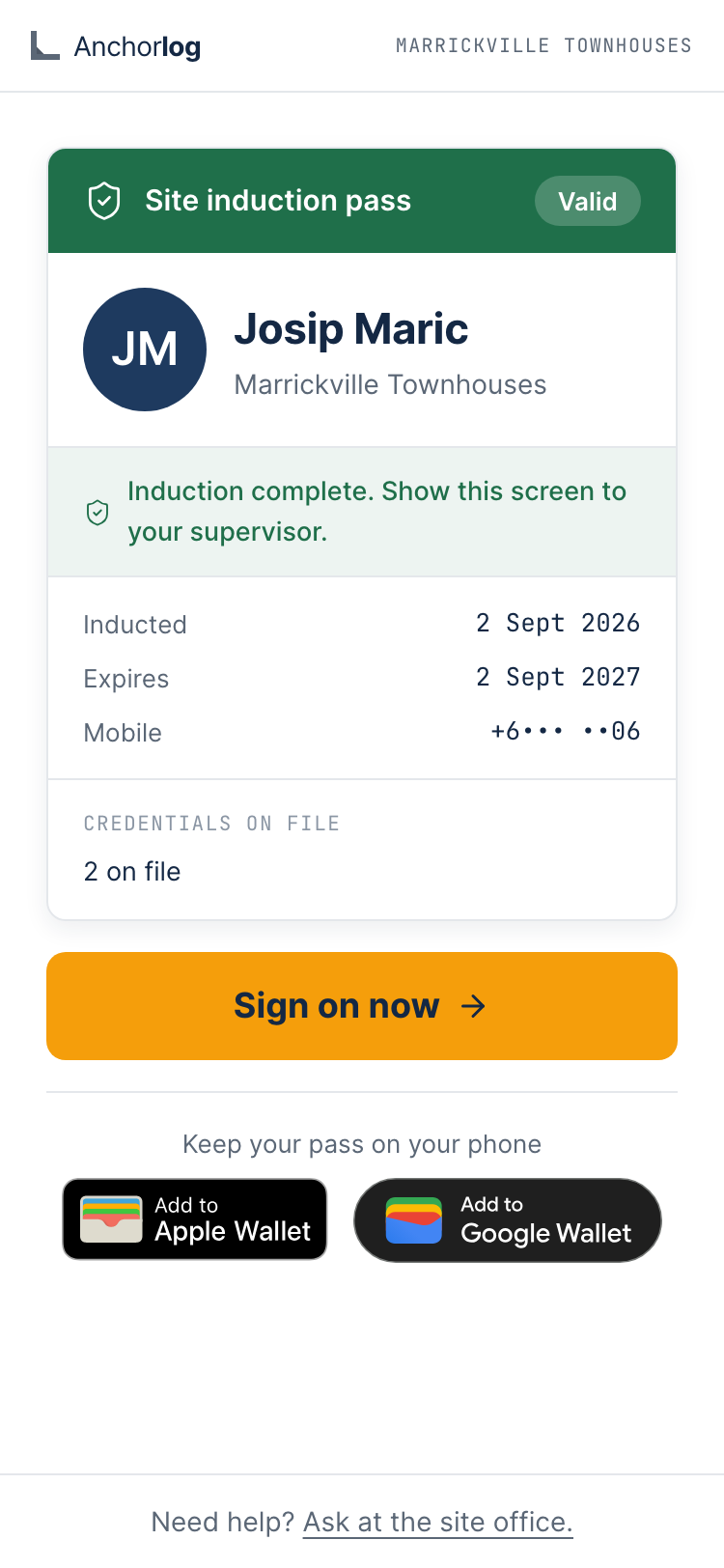
Sign on, on his own phone. Scan the board, put in a mobile number, tap. A worker who has been on site before gets a texted one-time code; that is the whole login.
Sample site, not a customer's.
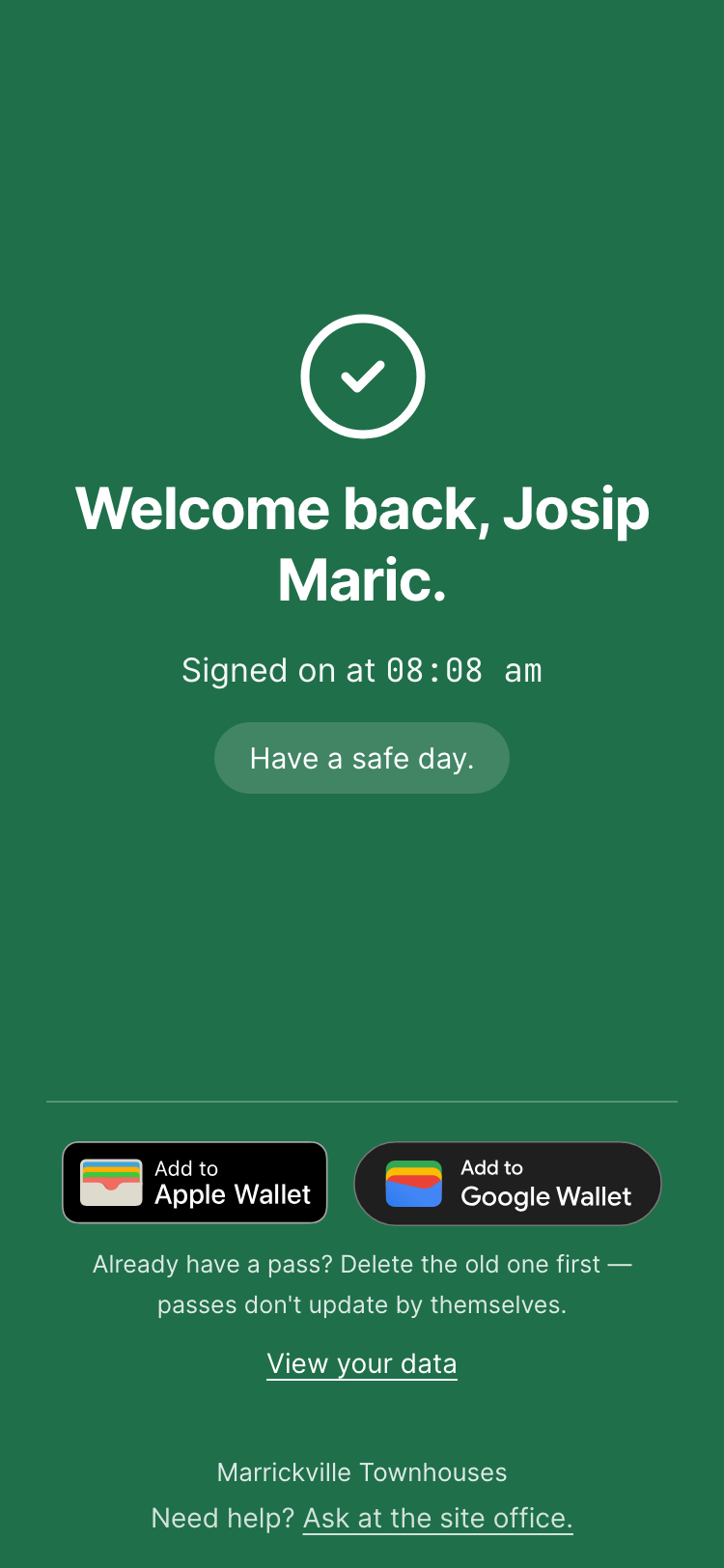
Signed on, and the time it was recorded is the record.
Sample site, not a customer's.
A worker signs on, start to finish. Fifteen seconds, no sound, no autoplay. Press play.
Sample site, not a customer's.
The pass, in the wallet he already has. Apple or Google. It doesn't refresh by itself.
Sample site, not a customer's.
The gate
Will the subbies use it?
The recording above is the whole of it: scan, mobile number, tap. Four things sit around that.
If he's been inducted on an Anchorlog site before.
If he has, the new site's form arrives already filled with his own details and ticket numbers once he proves his mobile by text. He still reads this site's content, answers its questions and signs again. Ticket photos are re-uploaded.
The gate works before the board arrives.
Print the site's QR poster yourself as a PDF the day you set it up (one for induction, one for sign on and sign off), so the gate works before the Coreflute board arrives.
If a board is copied or walks off.
Rotate the site's QR codes from the dashboard: every old code for that site stops working at once, the retired ones are kept on record, and you reprint the posters.
The safety content has to be opened first.
The induction won't submit until every required safety block has been opened on his phone. His phone reports each block opened, and Anchorlog records that on the server before it lets him submit. Opened, not read.
What you see
The live roster: who is on site now, and one worker signed on but not cleared to start, with the reason. It refreshes on its own. Presence, not tracking.
Sample site, not a customer's.
Every site on one screen, and which one needs you today.
Sample site, not a customer's.
The audit pack, from the top: pick the sites and the window, one action, and every sign-on, induction and SWMS acknowledgement in it comes out as one export. Further down the same page, the ROI working, hours of manual reconstruction figured from your own sign-on records, at an hourly rate you set yourself.
Sample site, not a customer's.
Procurement-due-diligence
Statute-anchored sign-on, built like infrastructure.
Anchorlog is built around the records NSW builders are required to keep. Every sign-on, induction and SWMS acknowledgement is time-stamped to the second, kept seven years, and exportable as a single audit pack on demand.
Retention isn't an afterthought at export time. It's stamped on every record the moment it's created, so nothing is quietly deleted while it still matters, and nothing has to be reconstructed when the question is finally asked.
The ROI view works out the hours it would take to rebuild your own sign-on records by hand, at a fixed per-record estimate, and prices them at an hourly rate you choose. A simple work-rate view surfaces from sign-on data as a side-effect: not an analytics platform; not a productivity dashboard; a quiet readout of what the site is doing while you're not standing on it. Both are in the product today.
retention-tagged at capture · seven-year record · one-action export
One action pulls the whole pack together: every sign-on, induction and SWMS acknowledgement, kept seven years. The photos and files inside it open from links that last thirty days, and the pack's own download link lasts an hour and is re-issued each time you open the export. Pull the evidence when you export it, not months later.
The audit pack
What you hand the inspector.
Open a sample audit pack (the product's own evidence PDF, rendered from made-up data) and a sample sign-on record. No signup, nothing to install.
PDF
Sample audit pack
Made-up data · the evidence PDF on its own · rendered from the product's own template
The sample is the evidence PDF on its own. A live export is a ZIP that also links to the photos and files, under the link lifetimes above.
When the question is about one week, one site or one bloke rather than the whole pack: attendance and inductions export to CSV or Excel, a site's evidence summary exports as a PDF, and any one worker's full record exports as a dossier.
The live roster shows who is on site right now and, separately, who has signed on but isn't cleared to start work, with the reason. That state is a flag for your judgement, not a turnstile.
Contractor paperwork
Your contractors' paperwork.
On sites where you switch the SWMS module on, your subcontractors do their paperwork through one no-account link, and it lands with you:
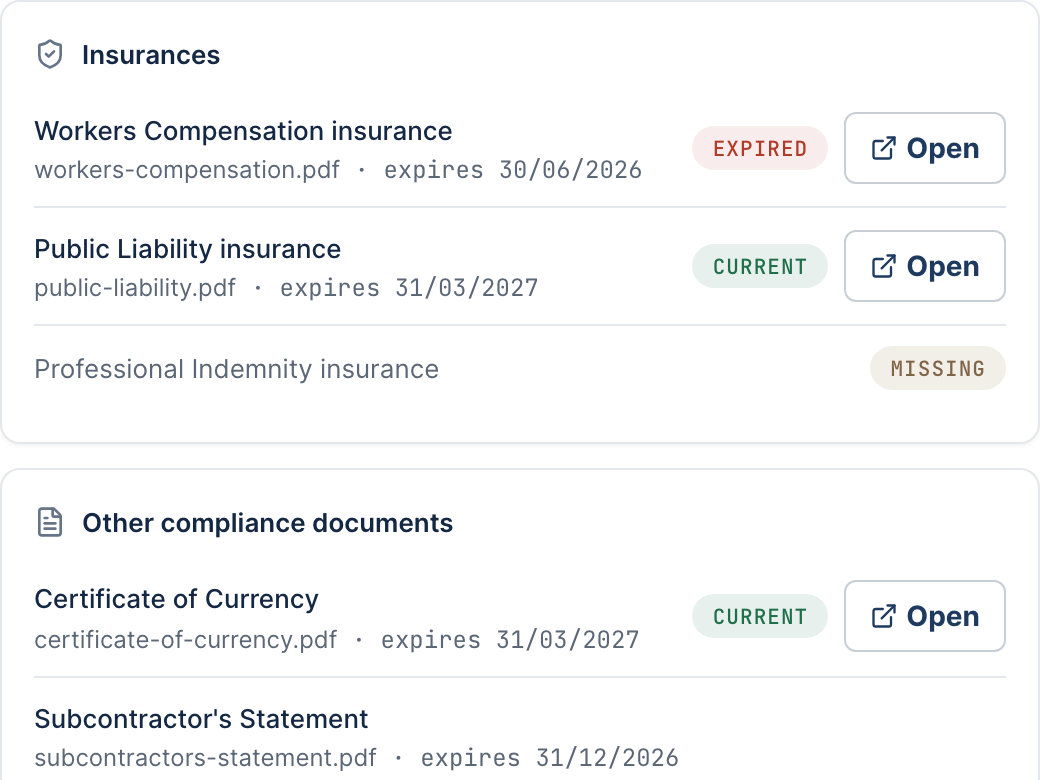
One contractor's documents, as your site manager sees them: what is on file, what has lapsed, what was never provided.
Sample site, not a customer's.
The detail
SWMS, submitted and reviewed. They submit their SWMS through a token link (no account), and you approve or reject it from your queue. You get an email the first time a SWMS lands for a work package.
Insurances, through the same link. They upload their insurances, certificate of currency and subcontractor's statement, each with its expiry date, and it lands in your queue for review.
Expiry, tracked per document. Every document's expiry is tracked, flagged in your alerts from thirty days out, and emailed to your owners, admins and site managers as the date approaches: the subcontractor's statement dated from the end of its period, not a made-up expiry.
One click, one bundle. A site's (or one contractor's) approved SWMS and the insurances on file, zipped with a cover sheet that prints each document's expiry and review state: the thing a prequalifier or a principal asks for.
Chase what's missing. Chase a contractor for a document he's never given you. One click, and he gets an email with a fresh upload link. It's for missing documents, not expired ones.
Suspend, and the emails stop. Suspend a contractor on a site and the expiry emails about his documents stop; his alerts stay in your feed until you clear them.
Refusals
What it won't do to your crew.
The detail
It won't rank them. The work-rate view won't rank your crew by hours. Alphabetical, full stop. It's a record of who signed on, not a scoreboard of who worked hardest.
It won't invent a number. If the ROI view can't work out a real figure from your own records and your own hourly rate, it says so.
It won't time his induction. Anchorlog measures how long a worker was on site. It does not and cannot measure how long his induction took.
Reserved · the registers the law makes him keep
Reserved. Rows F-55, F-52, F-53, F-54 not yet written.
Unhide trigger: ledger rows for F-55, F-52, F-53, F-54 · one screenshot of the silica register (synthetic) · never a section number
Reserved · if something happens on site
Reserved. Rows F-56, F-57 not yet written.
Unhide trigger: ledger rows for F-56, F-57 · one screenshot of an incident record with evidence attached (synthetic)
Reserved · who can see this, and the blokes' own data
Reserved. Rows for the worker portal, F-16, F-62 not yet written.
Unhide trigger: ledger rows for the worker portal, F-16, F-62 · one screenshot of /my-data (synthetic worker)
Free download · no email required
NSW Industrial-Manslaughter Checklist.
What to have ready before SafeWork arrives.
Eighteen items, plain language. Use it Monday morning on any site you run.
No email gate · ungated link
Pricing
Statute-anchored sign-on. At NSW SMB price.
Every plan is the full product. You pay for how many sites you run. Nothing else.
All prices AUD, incl. GST.
Anchorlog Starter
A$1,490/ year
1–3 active sites
QR inductions
Sign on and sign off in under 3 seconds
Unlimited workers, unlimited subbies, no per-worker fees
Live site roster
One-click audit packs
Credential expiry tracking
Contractor SWMS and insurances, switched on per site
Dedicated onboarding: we help bring your worker list across
Priority support
60-day money-back guarantee. Email us within 60 days of your first payment and we’ll refund everything you’ve paid for your plan. You don’t have to give a reason.
No lock-in contract. Cancel anytime.
Annual plans prepay 12 months.
About
Built single-purpose. Narrow on scope, broad on evidence.
Anchorlog is the statute-anchored at site induction and sign-on platform for NSW builders. Built single-purpose, narrow on scope, broad on evidence.
The day a worker was hurt on site, the questions were simple. Who is this, who do we call, what insurances are on file? Had they been inducted to this site, seen the WHS plan, signed on to their SWMS? I watched the search for an emergency contact end up through social media. The time to have those answers is before a person walks through the gate, not after.
Your records are stored in Australia. The primary database runs in Sydney. A small number of overseas providers handle specific functions (such as payments, email, SMS and error reports), and every one of them is disclosed in our Privacy Policy. Your data exports any time while you're with us. Induction, sign-on and sign-off records are kept for seven years automatically, even if you close your account, and nobody has to remember to archive anything.
What does Anchorlog cost?
Three plans, all AUD incl. GST, no per-worker fees: Starter $1,490/yr (1–3 sites), Pro $3,990/yr (4–20 sites), Scale volume pricing for 21+ sites, by conversation. Monthly billing available; annual saves two months. Cancel any time. Founding cohort: we hold your Pro-scale rate at $1,490/yr for as long as you stay with us.
How do I know Anchorlog is paying for itself?
Anchorlog has an ongoing ROI view in-product. It works out the hours it would take to rebuild your own sign-on records by hand, at a fixed per-record estimate. You see the number in your dashboard, not in a testimonial. The figure comes from your own attendance records multiplied by whatever you tell it an hour of digging through paper costs you; if it cannot work out a real figure, it says so instead of making one up.
Can I cancel?
Yes. Cancel any time. No annual lock-in surprise. After you cancel, your audit pack still exports from your billing page for as long as your account exists; the worker roster we pull for you on request.
What does Anchorlog NOT do?
Anchorlog doesn't replace your full safety-management system. We replace paper sign-on, the contractor paperwork that comes with it, and the audit-pack reconstruction that follows. We're not a scheduling tool, timesheets / payroll, project management, training-course platform, or generic compliance suite. There is no mobile app either: a worker uses the web page behind the QR code on his own phone, with nothing to install and no account to create. And an induction belongs to the site it was done at. Inducting a worker on one of your sites does not carry him across to another.
How does Anchorlog meet 'reasonable steps' defensibility?
By keeping the record you'd be asked for: every sign-on and induction retention-tagged from the day it's captured and kept seven years, and an audit pack you assemble in one action rather than rebuild from memory. Whether that meets 'reasonable steps' on your site is your call and your safety consultant's. Anchorlog keeps the evidence; it doesn't make the judgement.